How we built and launched this site with Claude Code and Hostinger in one evening
A step-by-step build log: picking the niche, building a static Astro site with Claude Code, and deploying it to Hostinger from GitHub, including what went wrong.
ToolDebrief earns a commission if you buy through some links on this page. It costs you nothing extra and never changes the verdict. How this works.
ToolDebrief went from an empty folder to a live, indexed site on its own domain in a single evening on 13 November 2026. This is the log of how, written while the details were fresh. It covers the decisions as well as the steps, because the decisions took longer.
What we used and what it cost
| Item | What it does | Cost |
|---|---|---|
| Claude Code | Wrote the code, ran builds, handled Git and deploys | Included in a Claude subscription |
| Hostinger web hosting | Serves the site | A paid shared-hosting plan |
.com domain from Hostinger |
The address | Yearly registration fee |
| GitHub | Private repository linking the two | Free |
| Astro | Turns Markdown articles into plain HTML files | Free, open source |
Hostinger’s prices change often with promotions, so check the current price on its site before you buy.
Step 1: choose the niche before the domain
We started with an expiring French domain about gift boxes and a simple question: renew it, or start fresh? Claude Code ran a research pass across affiliate programmes, seasonality and how fast new sites earn. The short version:
- Gift merchants pay a few percent on small baskets, and most gift searches happen in November and December. A site launched in mid-November misses that peak entirely.
- Software and AI tools pay per customer, often for 12 months, and searches run all year.
- An old domain with no content and no links ranks like a new one, so renewing it bought nothing.
So we let the old domain go, picked the software niche, and bought tooldebrief.com. The name
leaves room to cover any tool, not only AI ones.
Step 2: pick the right kind of site in Hostinger
Hostinger offers four ways to create a site. For a site that Claude Code builds, PHP/HTML website is the one that fits. The AI Builder is a closed editor, WordPress keeps content in a database rather than in files, and a plain content site does not need a Node.js server.
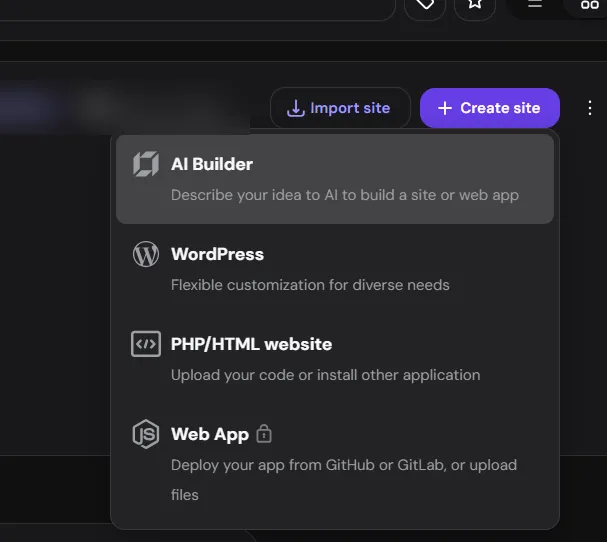
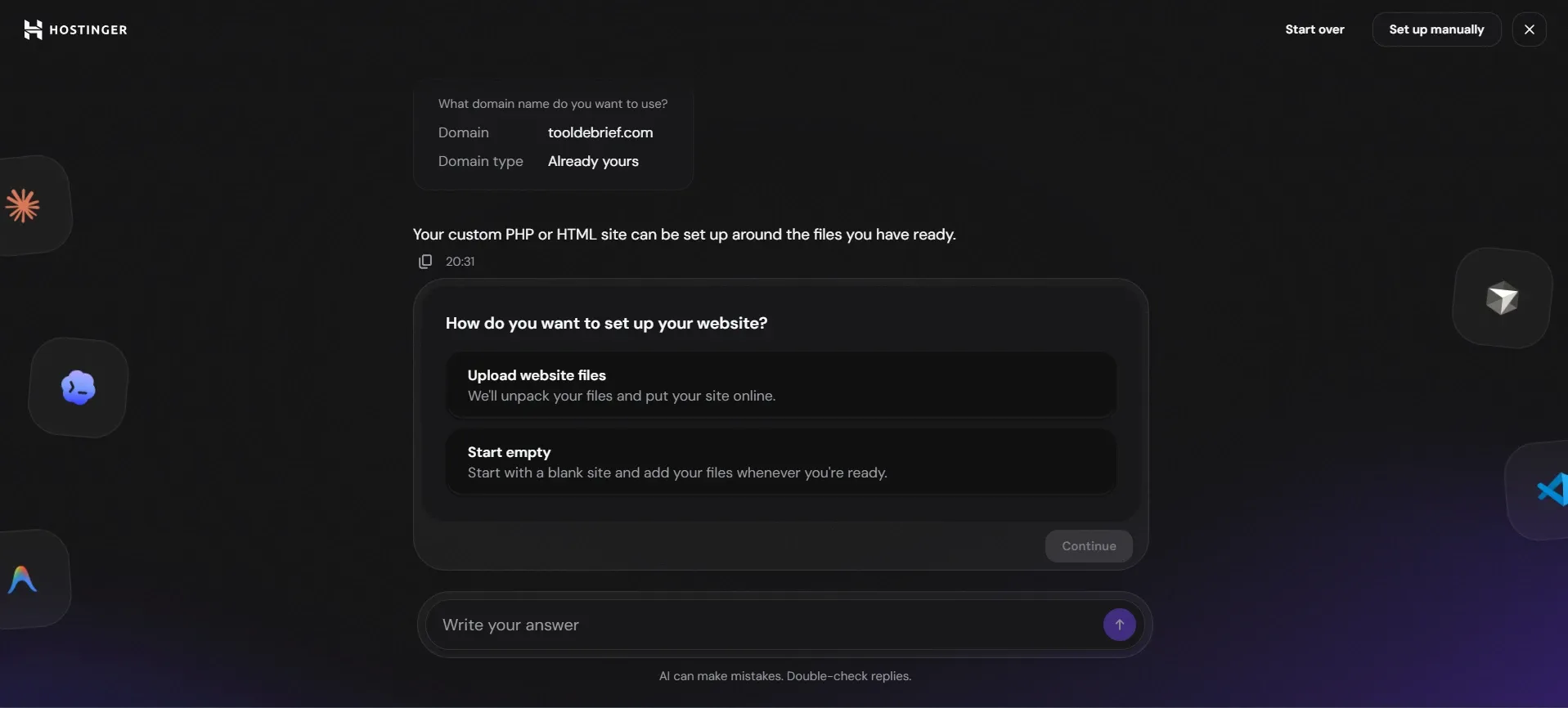
When Hostinger asked how to set it up, we chose Start empty. Uploading files would have meant uploading again by hand after every change.
Step 3: build the site
Claude Code generated an Astro project and then shaped it around how a review site works:
- Four sections: reviews, comparisons, alternatives and guides.
- A review template whose verdict box (score, what worked, what did not, price) is filled from a few lines at the top of each article file.
- One file that holds every affiliate link, with each link marked as sponsored for search engines.
- Pages for the testing method, affiliate disclosure and privacy, plus a sitemap and RSS feed.
- Empty sections hidden from search engines until they have an article.
What went wrong: the first build failed. The latest Astro release needed a newer Node.js than the one installed. Claude Code moved the project to the previous Astro version instead, which works with it. Updating Node.js later will allow the move back.
Step 4: connect GitHub and Hostinger
Claude Code created a private GitHub repository and pushed the code. It also added a deploy
command that builds the site and pushes only the finished HTML files to a separate branch named
deploy. The source code stays on main.
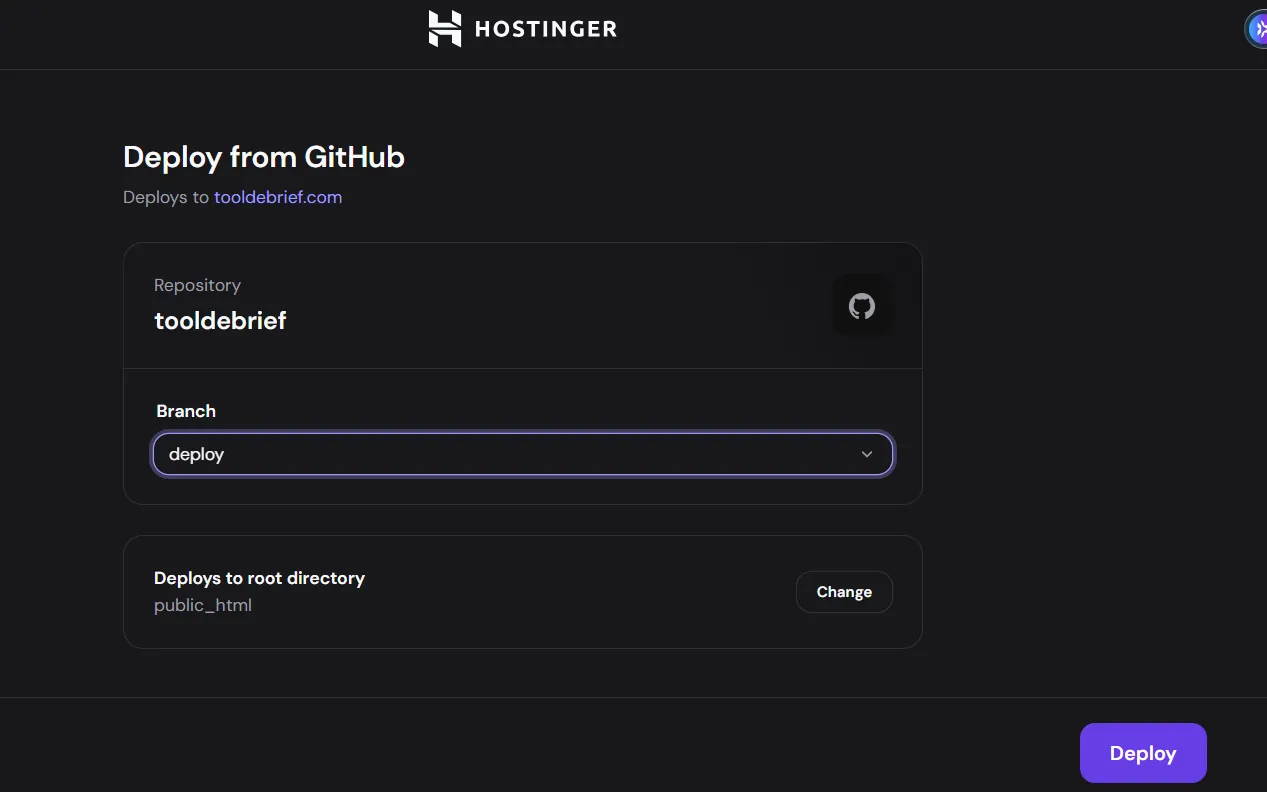
In Hostinger, Deploy from GitHub pointed at that repository, the deploy branch, and
public_html as the folder. One click on Deploy, and the site was live over HTTPS.
Claude Code then checked the live site: the pages answered, http:// and www. redirected to
the secure address, unknown pages showed the custom 404 page, and the sitemap was in place.
Step 5: redesign, then deploy from Claude Code itself
The first design was plain, so we asked for a more polished look. Claude Code rebuilt the styles and added a logo, then checked the pages at desktop and phone sizes.
To publish it without opening Hostinger, we installed Hostinger’s official plugin for Claude Code:
claude plugin install hostinger@claude-plugins-officialThe plugin connects to your Hostinger account after a one-time browser sign-in, started by typing
/mcp in Claude Code. Our first sign-in attempt did not register in the session we had open;
signing in again from that session fixed it. Claude Code then deployed the new design and switched
on auto-deploy, so every later push to the deploy branch goes live by itself.
Step 6: tell Google and Bing the site exists
A new site can wait weeks before search engines notice it. Two shortcuts helped:
- Bing: Claude Code added an IndexNow key to the site and submitted every page in one request. Bing accepted it straight away. Bing’s index is also reported to feed ChatGPT search.
- Google: we added the site to Google Search Console as a Domain property. Google gave a verification code, and Claude Code added it to the domain’s DNS through the Hostinger plugin. Google’s public DNS showed the record within a minute, and verification passed.
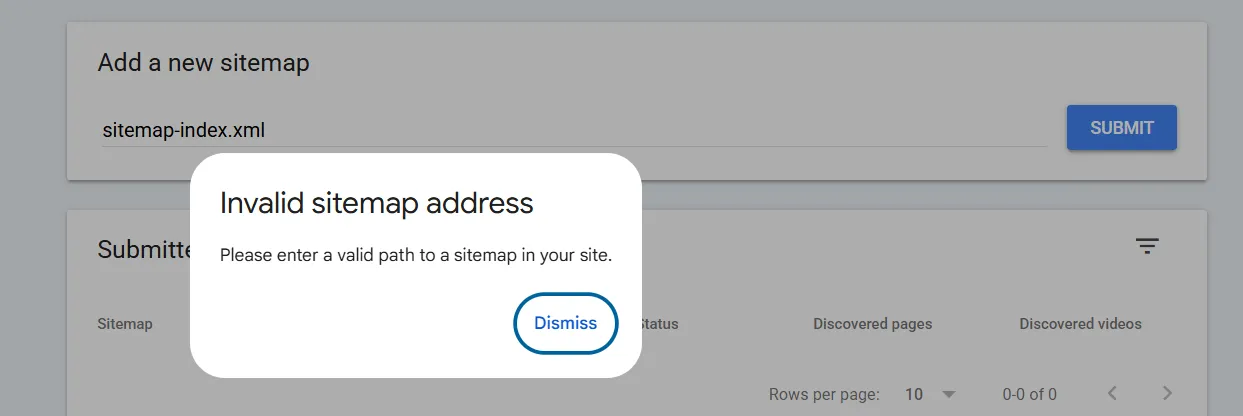
One snag: entering only sitemap-index.xml in Search Console was rejected. A Domain property needs
the full address, https://tooldebrief.com/sitemap-index.xml.
What we would do differently
- Check the Node.js version first. Five seconds of
node -vwould have avoided the version switch. - Decide the look before building. The redesign was quick, but describing the style up front would have saved a round.
- Sign the Hostinger plugin in from the session you plan to use it in.
- Type full URLs into Search Console when the property is a Domain property.
Is this setup worth it?
For a content site, yes. The result is plain HTML files: fast, cheap to host, and nothing to update or patch. The trade-off is that writing happens in text files rather than a visual editor, which suits someone working with an AI agent and may not suit someone who wants WordPress.