MailerLite review: a sign-up page, our own domain and a first email in about an hour
We built a MailerLite sign-up page with its AI builder, authenticated our own domain and sent a first campaign. It was fast, with a few things to check.
ToolDebrief earns a commission if you buy through some links on this page. It costs you nothing extra and never changes the verdict. How this works.
The quickest route we have tested from nothing to an email in the inbox from your own domain. Read every block the AI page builder writes before you publish, and know that the free plan stops at 250 subscribers and 2,500 emails a month.
- Our domain was authenticated about 20 minutes after we added three DNS records
- The DNS wizard named our host and gave an SPF value that already covered our existing mailbox
- The first campaign, sent from our own domain, landed in the Gmail inbox
- The AI builder produced three landing page designs in about 30 seconds
- 130 email templates, some already styled to match the brand settings
- The AI builder invented a "4.8" rating, a "Request a demo" button and app store badges
- Double opt-in is on by default, and unconfirmed sign-ups are hidden from the default subscriber view
- The free plan allows 250 subscribers, 2,500 emails a month and 1 landing page
- Free landing pages live on a subscribepage.io address and keep the MailerLite logo
- The industry search in the AI builder found nothing; we had to scroll the list
Price · Free plan, then Comfort from $12 or Power from $25 a month for 500 subscribers; yearly billing saves 10% (checked 14 November 2026)
MailerLite is an email marketing tool built around a simple promise: newsletters, sign-up pages and automations without the clutter of an all-in-one platform. We gave it the same job we gave Systeme.io: build a sign-up page, collect a subscriber and send them a first email from our own domain.
What we tested
On 14 November 2026 we used a MailerLite account in its 14-day trial, which unlocks the paid
features. We built a landing page for a weekly ToolDebrief email, signed up through it with a test
address, authenticated tooldebrief.com as a sending domain and sent a campaign to the new
subscriber. We did not enter a payment card.
What happened
Building the page: fast, but check what the AI wrote
MailerLite asks you to pick the subscriber group before you design anything, so we created a group called “Newsletter” first. Then we used the AI landing page builder: you describe the business, pick up to three goals and a style, and it writes the page.
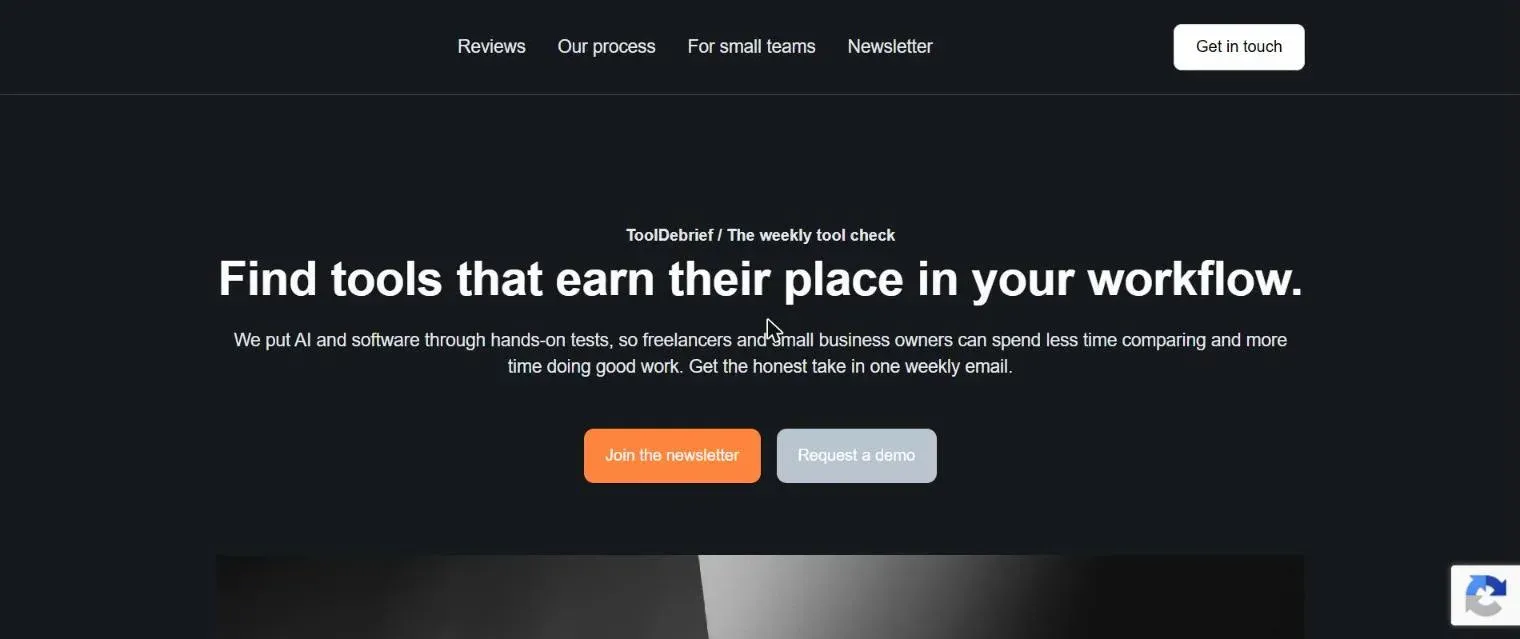
It produced three versions in about 30 seconds, and they looked good. The words needed more care. The draft we picked included:
- a “4.8” rating we never gave it,
- a “Request a demo” button, which makes no sense for a newsletter,
- App Store and Google Play badges, for an app we do not have,
- generic section headings that said nothing about us.
None of this is unusual for AI-written copy, but a rating and badges you cannot back up are the kind of thing you do not want live on your page. Read every block before you publish.
One small bug: the industry search in the first step found nothing for what we typed. Scrolling the list and picking “Software and Web App” worked.
From opening the builder to a published page took about 10 minutes. On the free plan, the page
lives on a subscribepage.io address; your own domain for pages is a paid feature.
Collecting a subscriber: worked, with one surprise
We signed up through the live page with a test address. The form showed “Thank you for subscribing!” straight away, with no puzzle to solve. The page uses an invisible CAPTCHA to filter out bots.

The surprise came in the dashboard. The subscriber list showed only one person, and it was not our test address. Double opt-in (a confirmation email before someone joins the list) is on by default, and MailerLite files people who have not clicked that link as Unconfirmed, outside the default “Active” view. After we clicked the confirmation link, the subscriber moved to Active and appeared in the Newsletter group.
Double opt-in is good practice: it keeps fake and mistyped addresses off your list. Just know that a new sign-up will not show up where you first look.
Authenticating our domain: the best part of the test
To send from hello@tooldebrief.com rather than a MailerLite address, you add your domain under
Account settings, then Domains. MailerLite recognised that our DNS is at Hostinger and
walked us through three records, one at a time. Each step stays locked until you mark the one before
it as added.
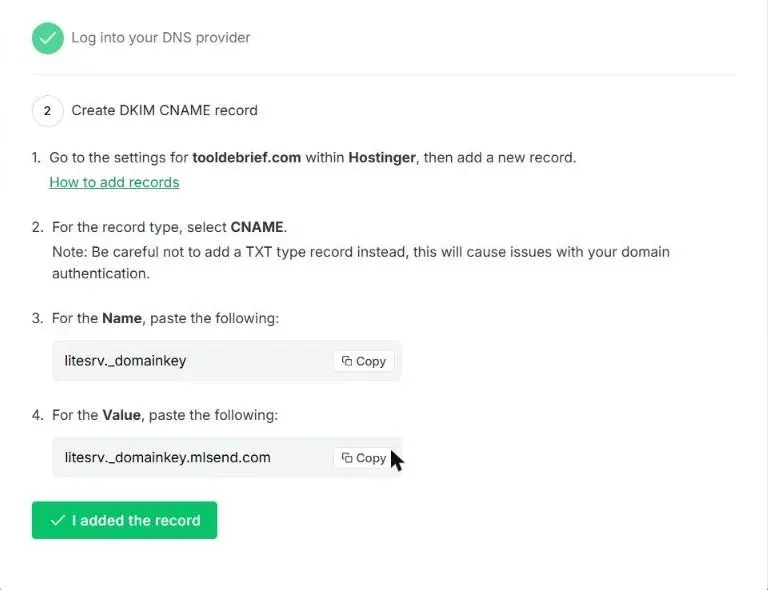
- A DKIM CNAME record, which lets inboxes check that the email really came from you.
- An SPF TXT record, which lists the servers allowed to send for your domain.
- A verification TXT record, which proves you own the domain.
The SPF step is where most tools leave you on your own. A domain can only have one SPF record, and ours already had one for our Hostinger mailbox. MailerLite’s step tells you to find the existing record and replace its value, and the value it gives already includes Hostinger’s mail servers next to its own. Get this wrong and your normal email can start landing in spam.
All three records were live on public DNS within minutes, and MailerLite showed the domain as Authenticated about 20 minutes after we finished. With Systeme.io, the same step took most of a day. MailerLite also made the domain the default sender, so there was no separate address to verify.
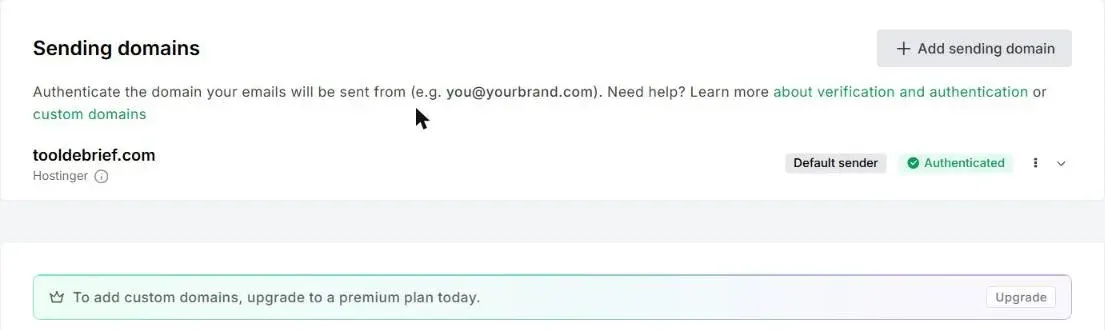
There is also a “switch to automatic authentication” option, which signs in to your DNS host and adds the records for you. We added them by hand, so we cannot say how well it works.
Sending the first campaign: one more gate
A regular campaign starts in a template gallery of 130 designs. We picked “Weekly digest” from the new Simple emails set, changed the headline and opening line, and moved on.
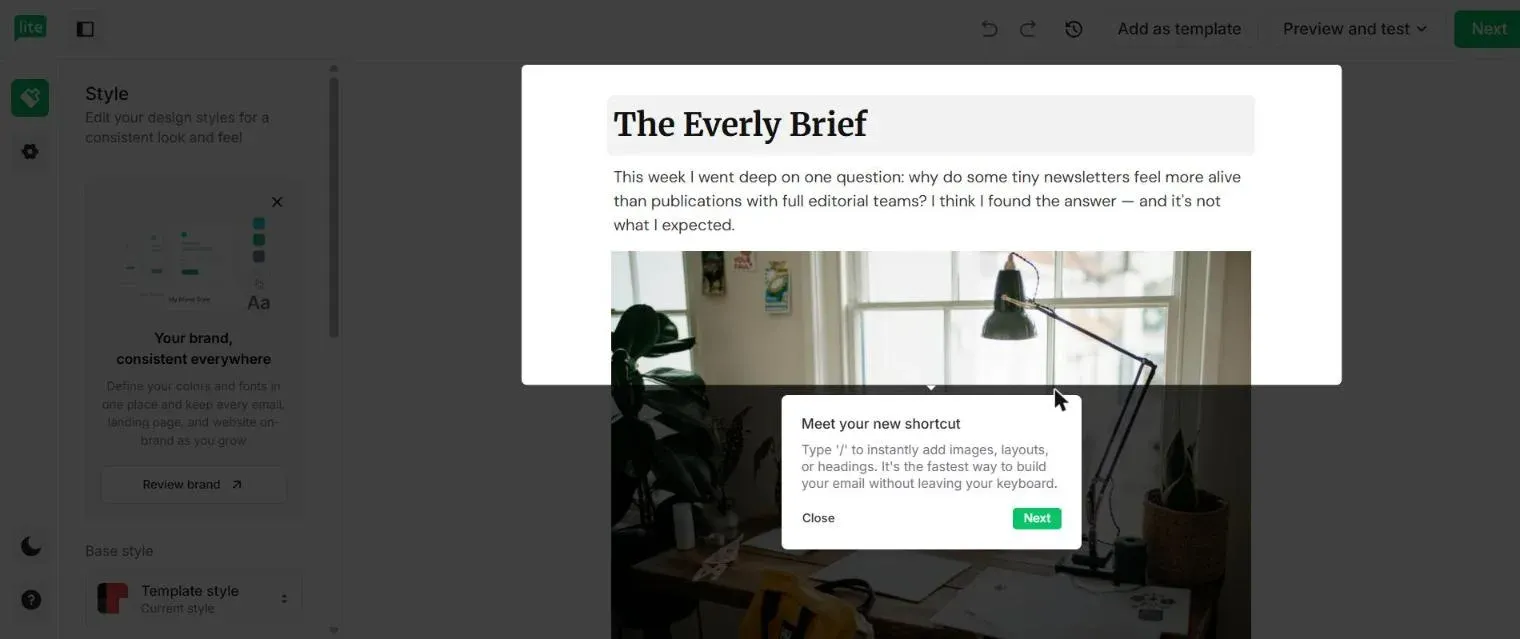
Three things to watch on the details screen:
- The sender name is pre-filled with your account’s workspace name, which may not be the brand your readers know. We changed it to “ToolDebrief”.
- Open tracking is on by default; link tracking is off.
- Recipients are groups. Ours had one subscriber, our test address.
Pressing Send now did not send anything straight away. MailerLite first showed a summary of its terms (what counts as spam, what you may and may not send) and asked us to confirm we had read them. After that, the campaign waited in the Outbox, marked “Will begin sending soon”, for about three minutes before it went out.
The email arrived in the Gmail inbox, not spam or Promotions.
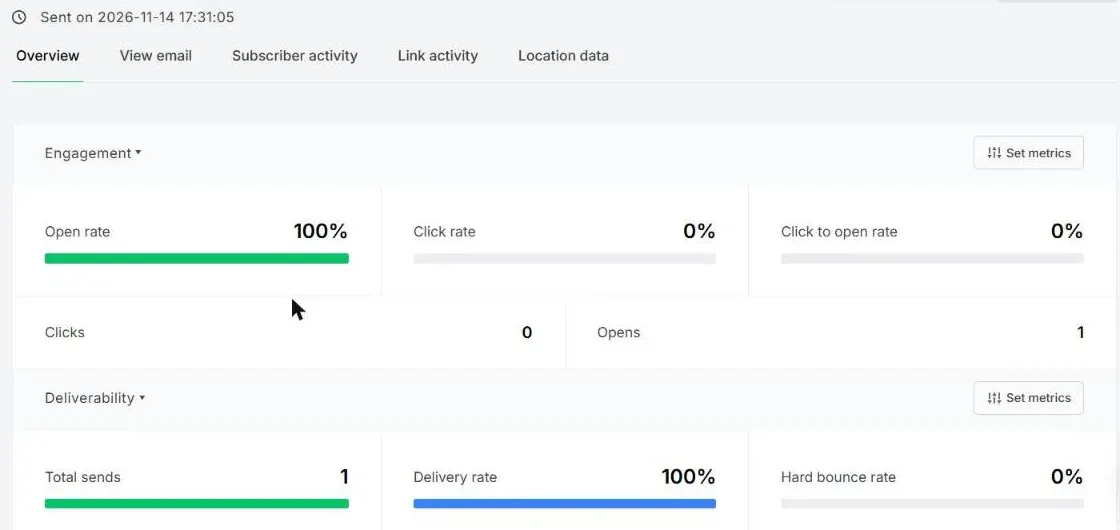
From creating the landing page to the email in the inbox took about an hour, most of it reading and checking rather than waiting.
Where it fell short
- The AI builder’s copy. It saves time on layout, but it filled our page with claims we could not support. Treat its output as a draft.
- Hidden unconfirmed subscribers. Sensible default, confusing first experience.
- The free plan is small. 250 subscribers and 2,500 emails a month is enough to start, not to grow. Systeme.io’s free plan allows 2,000 contacts and unlimited emails.
- No own domain for free landing pages, and the MailerLite logo stays on free pages and emails.
Pricing
Prices from the MailerLite pricing page on 14 November 2026, billed monthly, for the smallest list size. Paid prices rise with the number of subscribers. Yearly billing saves 10%.
| Plan | Price | Subscribers | Emails a month | Automations | Landing pages | Forms |
|---|---|---|---|---|---|---|
| Free | $0 | 250 | 2,500 | 3 | 1 | 3 |
| Comfort | $12/mo | 500 | 5,000 | 50 | 10 | 10 |
| Power | $25/mo | 500 | Unlimited | Unlimited | Unlimited | Unlimited |
Only the paid plans remove the MailerLite logo and allow your own domain for pages. On the free plan, the AI landing page builder can be used once. Every new account starts with a 14-day trial of the paid features, with no card needed.
What we did not test
We tested during the trial, so we did not check which of these steps behave differently once an account drops to the free plan. We also skipped automations, embedded forms and pop-ups, paid newsletters and the automatic DNS option. Those are on the list for a later update.
Who should use it
Use it if email is the main job: a newsletter, a welcome sequence, a simple sign-up page. The domain setup is the smoothest we have tested, and our first email went straight to the inbox.
Skip it if you expect a list of more than a few hundred people without paying, or if you also want courses, a shop and sales pages in the same account. For that, the Systeme.io free plan goes further.
You can try MailerLite free on its own site; no card is needed.