Systeme.io review: we built a sign-up page on the free plan
We tested the Systeme.io free plan: a sign-up page in minutes, unlimited emails, and a sender setup that took longer than everything else combined.
ToolDebrief earns a commission if you buy through some links on this page. It costs you nothing extra and never changes the verdict. How this works.
Worth starting on if you need a sign-up page and an email list without paying: the free plan is real and the page builder is fast. Budget an hour for the email sender setup, and expect to move to the $17 plan once you want more than one automation.
- A live sign-up page from a template in under 10 minutes, on a free subdomain
- Free plan with 2,000 contacts and unlimited emails, no credit card
- Sign-ups land in the contact list instantly
- Our first newsletter from our own domain reached the Gmail inbox, not spam
- Pages, email, courses and payments in one account, with 0% transaction fees
- Sending from your own domain needs a verified address, domain authentication and four DNS records
- The free plan allows 1 tag, 1 email campaign and 1 automation rule
- A new funnel sends sign-ups to a placeholder "thank you" page until you design one
- A "Powered by systeme.io" badge shows on free-plan pages
- Newsletters only go to tagged contacts, and the free plan gives you one tag
Price · Free plan, then $17, $47 or $97 a month; yearly billing gives two months free (checked 14 November 2026)
Try Systeme.ioSysteme.io sells itself as the all-in-one tool for people who want to run an online business without paying for five separate subscriptions. We wanted to know one thing: can someone with no budget build a working email sign-up page on the free plan, and how long does it really take?
What we tested
On 14 November 2026 we opened a new Systeme.io account on the free plan and set ourselves one job: build the sign-up page for a weekly ToolDebrief email, collect a test subscriber and send them a first email. We did not enter a payment card at any point.
What happened
Building the page: fast
Creating a funnel (Systeme.io’s name for a set of linked pages) took under a minute. We picked the
“Build an audience” type, and Systeme.io created two pages for us: the sign-up page and a thank-you
page. We chose a template, changed the headline and the paragraph, renamed the button to
“Subscribe” and saved. The page was live straight away on a free systeme.io subdomain.
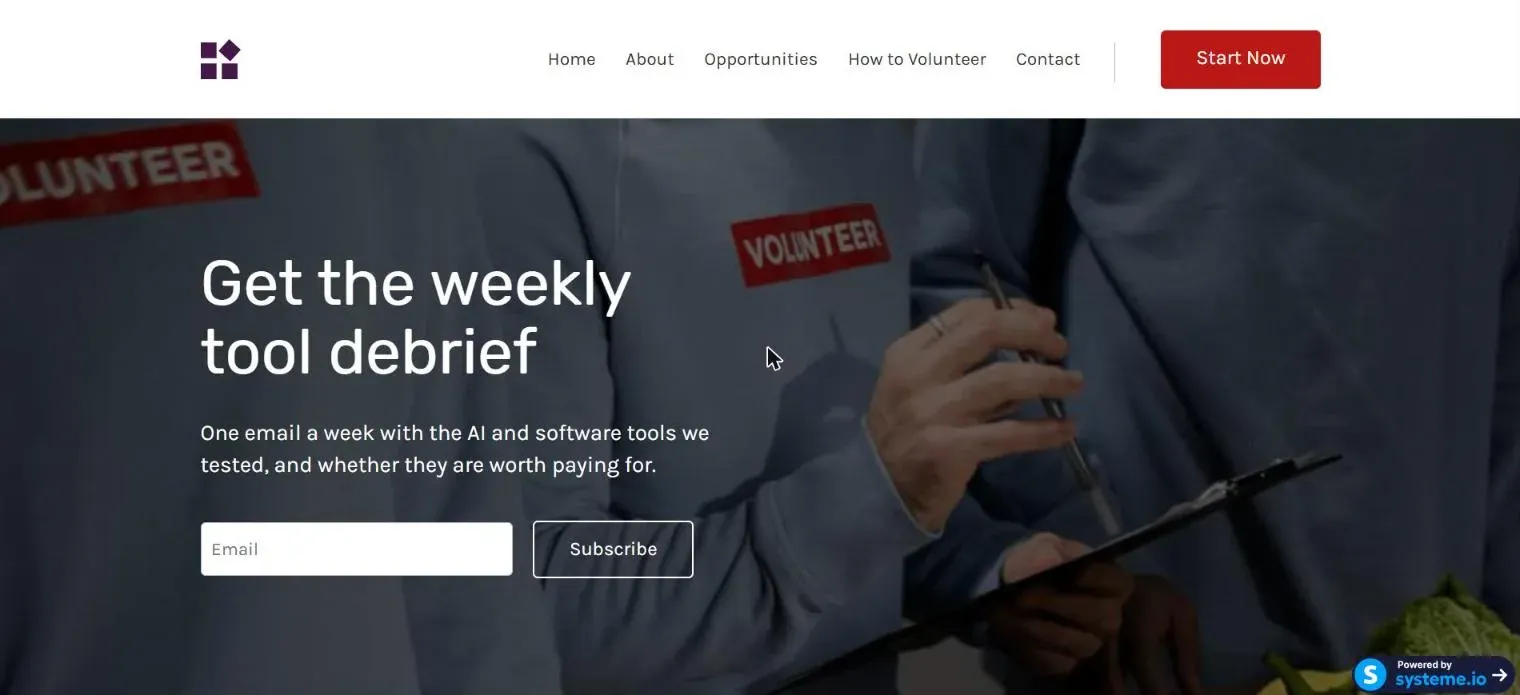
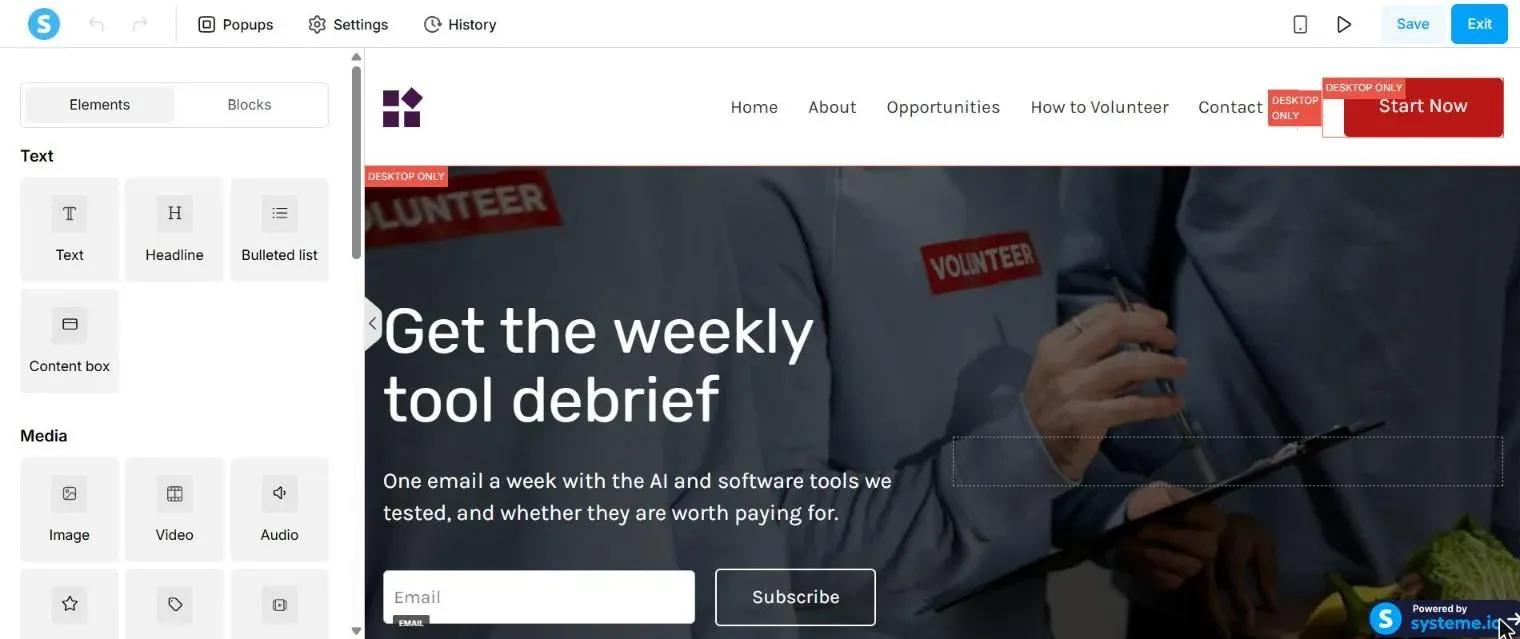
Two small snags in the editor:
- When we replaced the template’s headline, the new text came out in a dark colour that was hard to read on the photo behind it. We had to set the colour back to white by hand.
- Some template elements are marked Desktop only, so the page needs a check on a phone before you share it.
Collecting a subscriber: worked first time
We signed up through the live page with a test address. The contact appeared in the CRM within seconds, with the date and time of sign-up.
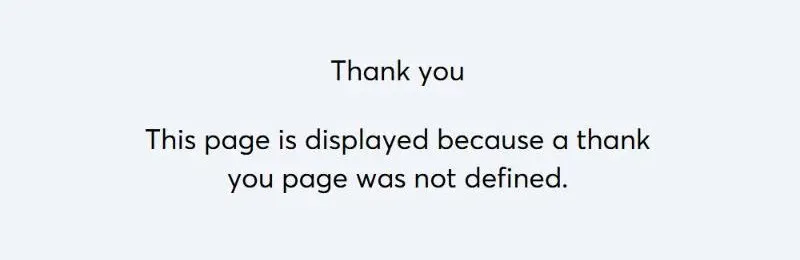
One trap: Systeme.io creates the thank-you page as an empty step. Until you pick a template for it, new subscribers land on a plain Systeme.io page saying that no thank-you page was defined. It works, but it is not what you want your first subscriber to see.
Double opt-in (a confirmation email before someone joins the list) is off by default. You can switch it on per form or in the email settings.
Sending the first email: the slow part
This took longer than everything else combined. Systeme.io will not send a newsletter until you add a verified sender address, and the account starts with none.
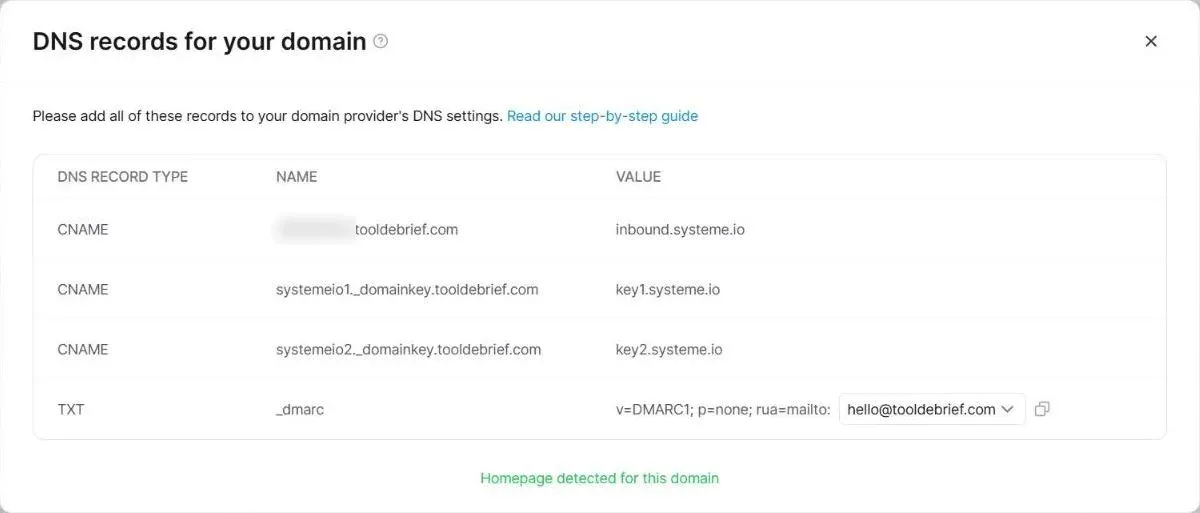
You can verify a Gmail or other free address in a few minutes. Emails sent “from” a free address through a marketing tool are more likely to land in spam, so we used an address on our own domain. For that, Systeme.io asked for:
- A click on a confirmation link sent to the address.
- Domain authentication: three CNAME records and one DMARC record added to the domain’s DNS.
The address was verified within minutes. The domain check runs on Systeme.io’s own schedule, with no button to re-run it. All four records were live on public DNS within a minute, but the domain only showed as verified later the same day.
Two more surprises came when we finally wrote the email:
- A newsletter goes to tags, not to “everyone”. Until you pick at least one tag, the newsletter warns that no one will receive it. Tags cannot be created from the newsletter screen or from a contact; they live on their own page under CRM. On the free plan you get one, so we spent ours on a tag called “newsletter”.
- The simple text editor dropped characters when we typed long lines quickly, cutting sentences off in the middle. Typing in shorter bursts fixed it, but check the text before you press send.
The result was worth the setup: the test email, sent from our own domain on the free plan, landed in the Gmail inbox rather than the spam folder. We wrote the whole process up as a step-by-step guide to sending from your own domain.
Systeme.io does deserve credit for the details here. The DNS screen fills in the exact values to copy, and the DMARC record offers a dropdown for the report address instead of making you type it. That address ends up in public DNS, so pick one on your own domain rather than a personal inbox.
Where it fell short
- The sender setup. None of it is unusual for an email tool, but nothing tells a new user up front that a single test email needs a verified address, DNS changes and a wait.
- The free plan’s single tag and single automation rule. Contacts are organised with tags, not lists. With one tag you cannot separate, say, newsletter readers from course students.
- One email campaign. Campaigns are automatic email sequences, such as a welcome series. The free plan allows one.
Pricing
Prices from the Systeme.io pricing page on 14 November 2026, billed monthly. Yearly billing gives two months free.
| Plan | Price | Contacts | Funnels | Tags | Campaigns | Automation rules |
|---|---|---|---|---|---|---|
| Free | $0 | 2,000 | 3 | 1 | 1 | 1 |
| Startup | $17/mo | 5,000 | 10 | 10 | 10 | 10 |
| Webinar | $47/mo | 10,000 | 50 | 100 | 100 | 100 |
| Unlimited | $97/mo | Unlimited | Unlimited | Unlimited | Unlimited | Unlimited |
Every plan includes unlimited emails, unlimited file storage and 0% transaction fees on sales.
What we did not test
We only tested the sign-up and email side. Courses, the shop, payments, webinars and Systeme.io’s own affiliate programme tool are on our list for a later test.
Who should use it
Use it if you are starting a newsletter, a small online course or a lead magnet and do not want to pay for anything until it earns. The free plan is genuinely usable, and the $17 plan removes the limits that start to hurt.
Skip it if you already run a large list with complex automations, or if you want pixel-level control of your pages. A dedicated email tool and a separate site builder will do each job better.
If it fits, you can start on the Systeme.io free plan; no card is needed.