Grammarly review: we drafted a real guide with the free plan
We used free Grammarly to outline and draft a guide on email authentication, then checked every fact. The AI was accurate; the free plan keeps a lot locked.
ToolDebrief earns a commission if you buy through some links on this page. It costs you nothing extra and never changes the verdict. How this works.
The grammar checker caught every mistake we planted, and the AI wrote an accurate outline of a technical guide in about 20 seconds. But longer AI drafts arrive as a "Pro sample", pasted in broken formatting, and the AI detector it advertises is Pro only. Free is a good spell checker with a taste of AI; Pro is $12 a month on yearly billing.
- Caught all 7 errors we planted in a test paragraph, each with the right fix
- The AI outline of an SPF, DKIM and DMARC guide was technically accurate
- The AI wrote straight into the document, about 20 seconds per prompt
- Works in the browser with no extension, desktop app or inbox to connect
- 100 AI prompts a month on the free plan, no card needed
- Our longer draft came as a one-off "Pro suggestion, free sample"
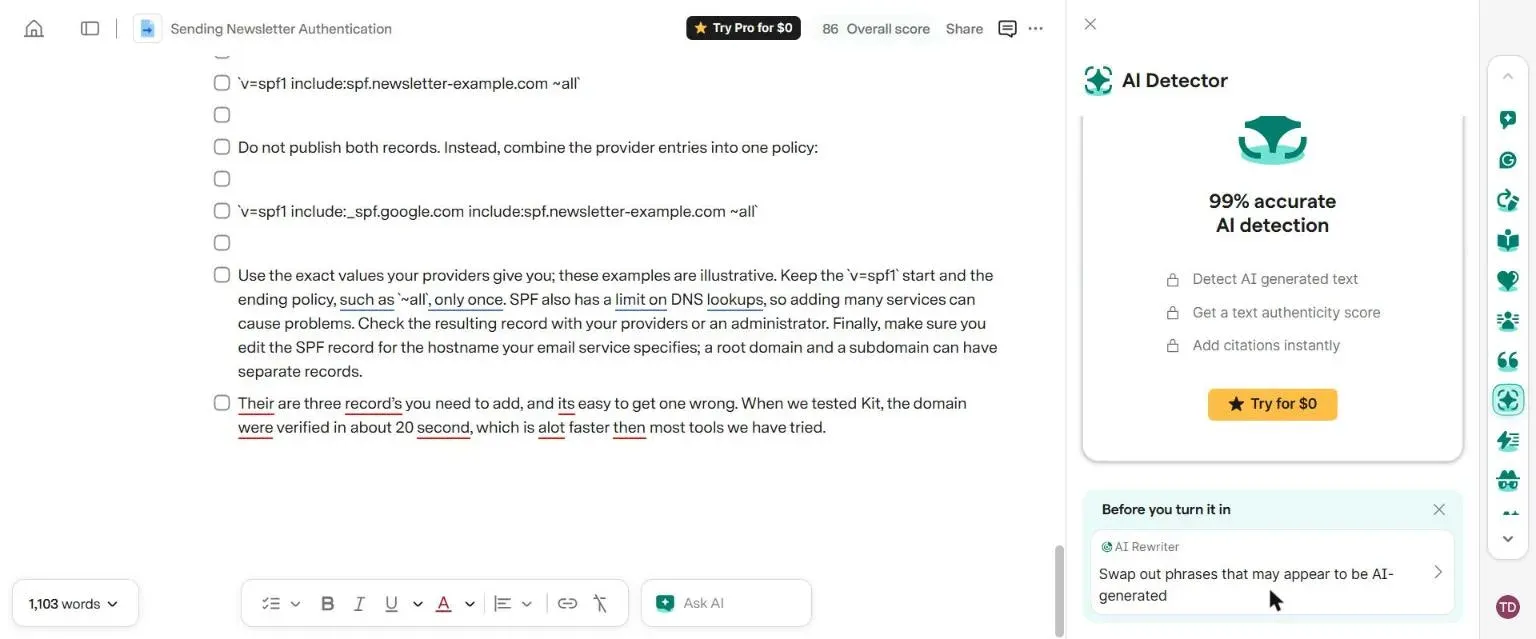
- Accepting it turned every paragraph into a checklist item and left Markdown symbols in the text
- The AI Detector is advertised in the free editor but locked behind Pro
- It flagged 31 issues in its own AI text, mostly "add a period" to bullet points
- We saw no counter of how many AI prompts were left
Price · Free with 100 AI prompts a month; Pro shown at $12 a month with 2,000 prompts (independent pricing guides list this as the yearly-billing rate); Enterprise on request (checked 14 November 2026)
Grammarly started as a grammar checker and now sells itself as an AI writing assistant. We wanted to know how far the free plan goes for the job most of our readers have: drafting a real article, then cleaning it up.
What we tested
On 14 November 2026 we opened a new Grammarly account on the free plan, with no trial and no payment
card. We used only the web editor at app.grammarly.com: no browser extension, no desktop app and
no connected inbox.
The task was a guide we know well, because we have just done it three times: how to send a newsletter from your own domain. That meant we could check every claim the AI made against our own tests of Kit, MailerLite and Systeme.io.
We used two AI prompts, then tested the grammar checker on a paragraph with mistakes we planted on purpose.
What happened
Prompt 1: the outline, and it was right
The free editor now opens documents on a coda.grammarly.com address: Grammarly owns Coda, and the
editor is built on it. A new document has an Ask AI box at the bottom.
We asked for an outline covering SPF, DKIM and DMARC records, why a domain can only have one SPF record, how to add the records at a DNS host and how to test inbox placement. About 20 seconds later, a six-part outline appeared directly in the document, and Grammarly renamed the file to match.
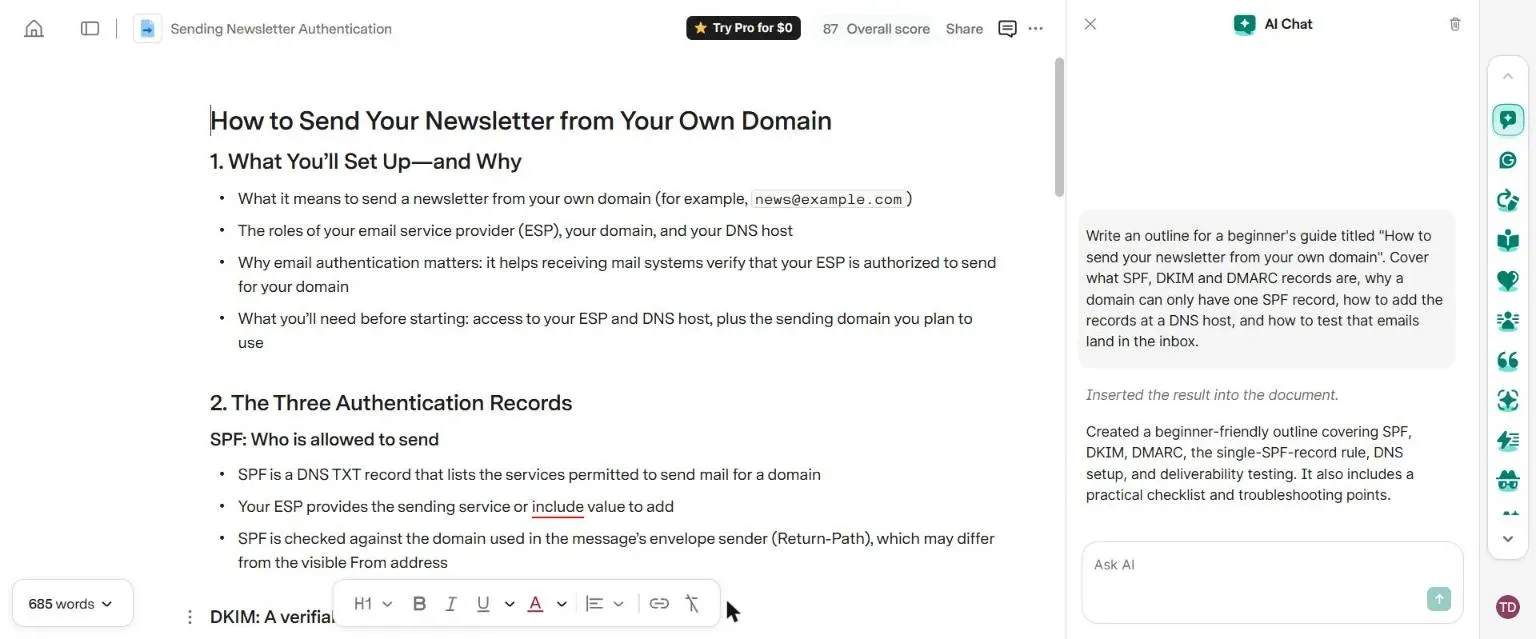
We checked it line by line. It was accurate, and better than we expected in places:
- It said two SPF records can cause a PermError, which is the correct technical term.
- It mentioned SPF’s limit on DNS lookups, a detail many beginner guides leave out.
- It said SPF is checked against the return address, which can differ from the visible From address. That is correct, and it is why Kit could add SPF without touching our existing record.
- It told readers to start DMARC with
p=none, which is what all three email tools asked us to do.
It did not invent any tool names, prices or statistics.
Prompt 2: a “free sample” of Pro
Next we asked for a 120-word introduction and a full 250-word section on the single-SPF-record rule, with an example of merging two SPF records.
This time the text did not go straight in. It appeared in a card labelled Pro suggestion · Free sample, with Accept and Dismiss buttons. Grammarly did not say how many free samples we get.
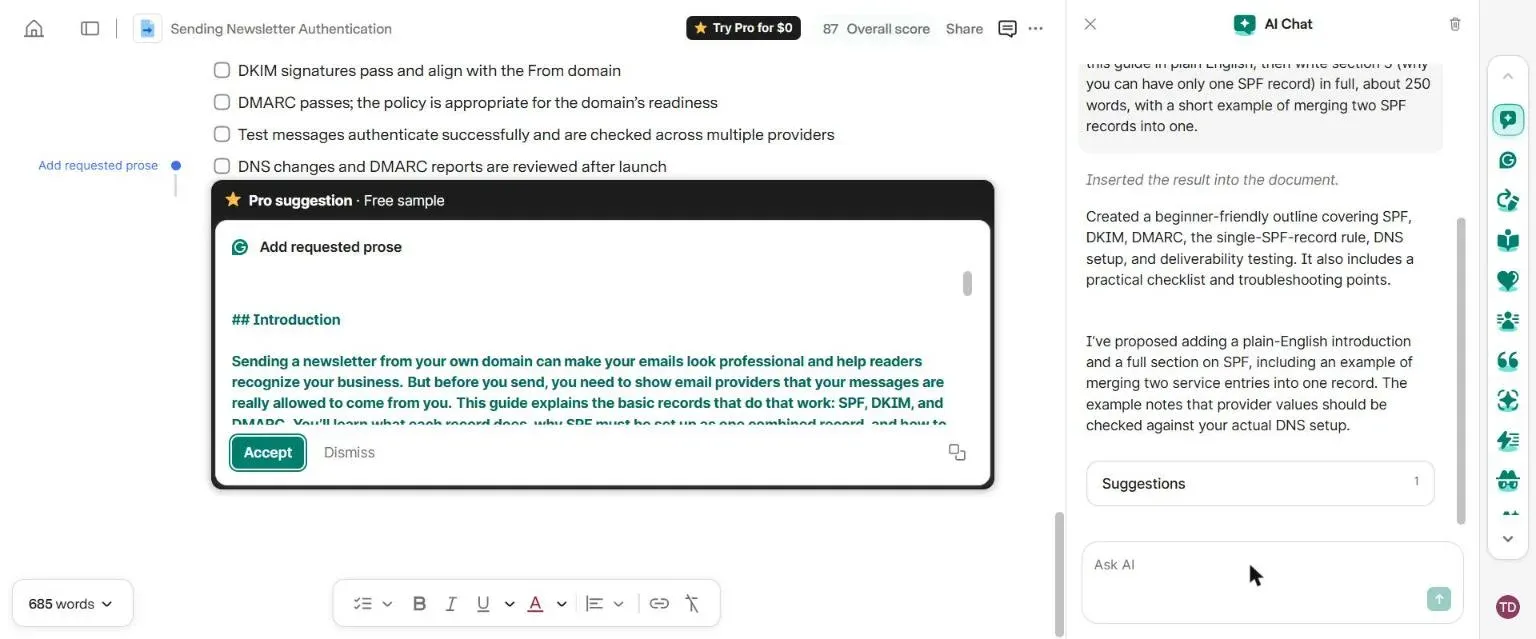
The writing itself was good. The introduction was about the right length and in plain English. The
merge example was correct: it took v=spf1 include:_spf.google.com ~all and a newsletter provider’s
record and combined them into one record with both include entries and a single ~all.
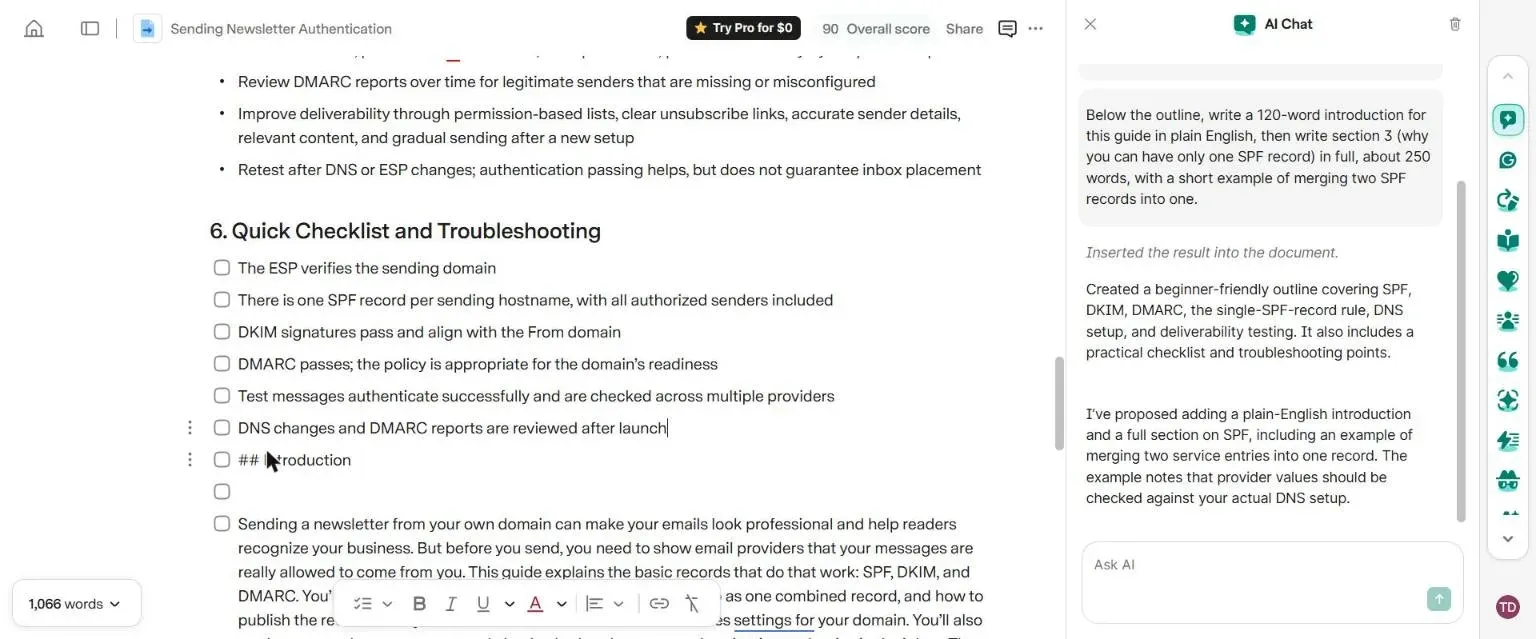
Then we clicked Accept. Every paragraph became a checklist item with a tick box, an empty tick
box sat between each one, and the Markdown symbols the AI used for headings and code (## and
backticks) appeared as plain text. The words were right, but tidying the layout would take longer
than writing the section headings by hand.
The grammar checker: 7 out of 7
We typed one paragraph with seven mistakes:
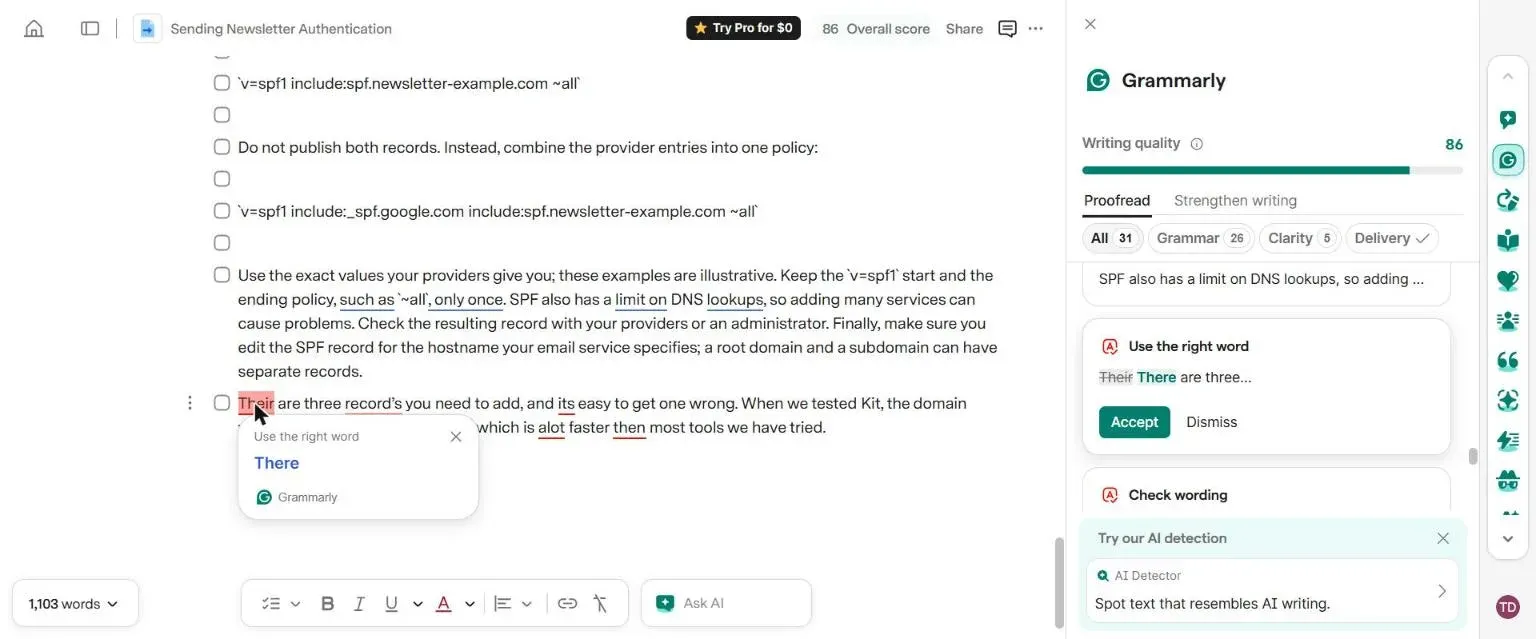
Their are three record’s you need to add, and its easy to get one wrong. When we tested Kit, the domain were verified in about 20 second, which is alot faster then most tools we have tried.
Grammarly underlined all seven within a few seconds: their, record’s, its, were, second, alot and then. Each card offered the right fix, such as “There” for “Their”. This is still what Grammarly does best, and it is free.
Checking its own AI text
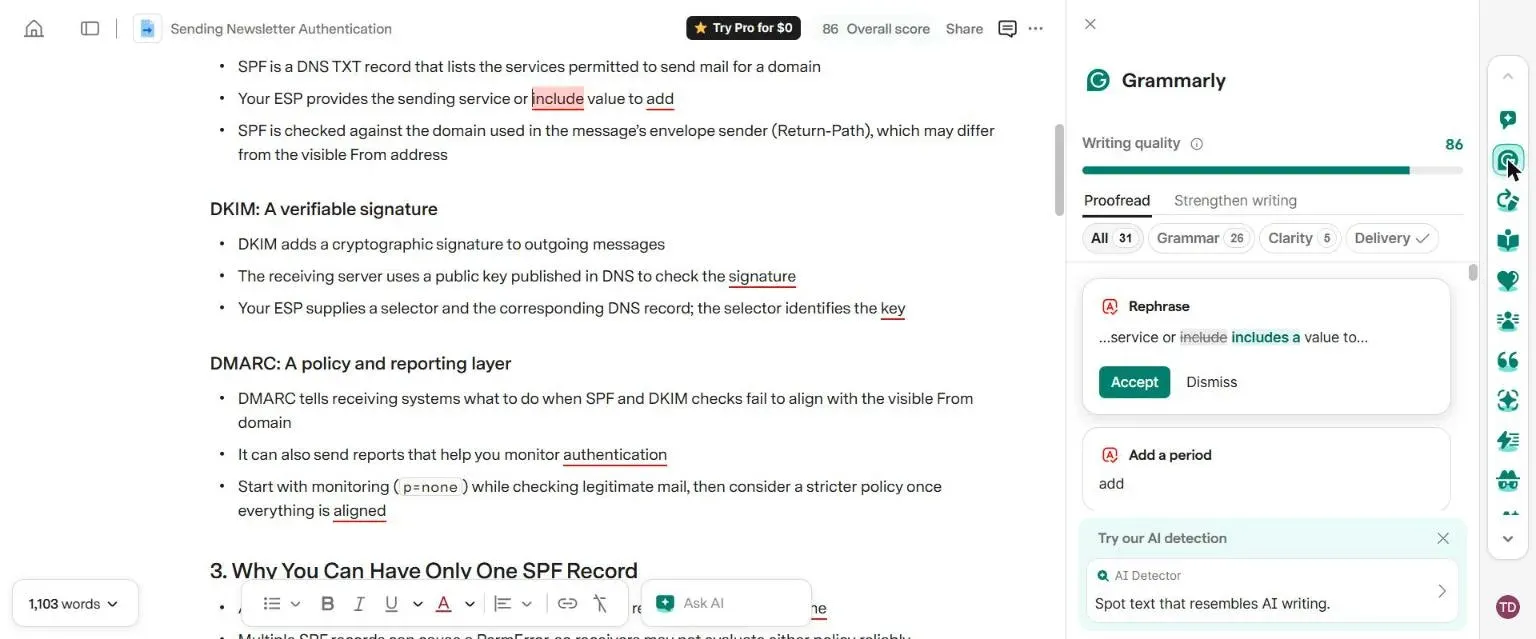
The suggestions panel also checked the AI-written outline and found 31 issues. Most were “Add a period” on short bullet points, which is a style choice rather than a mistake.
One was wrong. In the line “Your ESP provides the sending service or include value to add”,
Grammarly suggested changing “include” to “includes a”. Here include is an SPF keyword, so the
change would make the guide less accurate. Treat suggestions on technical text with care.
The AI Detector is Pro only
The free editor shows a “Try our AI detection” box in the sidebar. Clicking it opened a locked page with a Try for $0 button: detecting AI text, the authenticity score and citations are all Pro features. Below it, Grammarly promoted an “AI Rewriter” to “swap out phrases that may appear to be AI-generated”.
Other things we noticed
- A banner asked us to download the desktop app to “finish setup”. The web editor worked without it.
- We found no counter of AI prompts used or left, in the editor or on the account page. The plan page says the free limit is 100 prompts a month.
- The “Try Pro for $0” button stays at the top of the editor. The plans page says Grammarly emails a reminder two days before a trial ends.
Price
| Plan | Price | AI prompts | What you get |
|---|---|---|---|
| Free | $0 | 100 a month | Spelling, grammar, tone detection, limited AI chat |
| Pro | $12 a month | 2,000 a month | Full-sentence rewrites, tone changes, plagiarism and AI detection |
| Enterprise | On request | Unlimited | Admin, security and support features |
Grammarly’s plans page shows Pro at $12 a month. Independent pricing guides say that is the rate on yearly billing and that paying month to month costs more, so check the total at checkout.
Who should use it
Use the free plan if you want a reliable spelling and grammar check in the browser, plus a few AI outlines a month. For that, it is hard to beat.
Consider Pro if you rewrite a lot of text, need plagiarism checks or use AI prompts daily. Two thousand prompts a month is more than most solo writers will use.
Skip it if you mainly want an AI to draft long articles. The free plan gives you a sample, not a workflow, and the formatting of long drafts needs fixing either way.
The bottom line
Grammarly’s AI got the facts right on a technical topic we know well, and its grammar checker caught every planted mistake. The free plan is worth having for the checker alone. The AI drafting and the AI detector are clearly there to sell Pro: plan to pay if you want either one for more than a test drive.